FAQ Charging
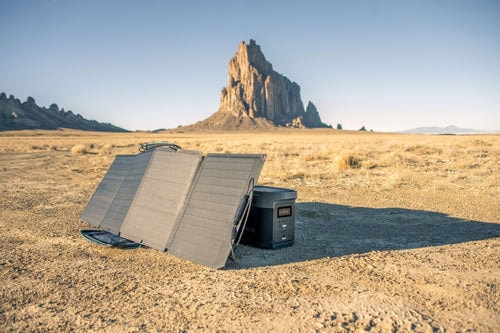
What are all the ways to charge DELTA?
You can charge it from a wall outlet, car outlet, and solar panel. You can also charge it with a gas generator that provides AC power that is 100V-120V (50Hz/60Hz) and at least 1500W.
Can I use DELTA while it’s charging?
Yes, DELTA can discharge when connected to an AC input, car outlet, or solar panel.
Can I charge DELTA with a third-party solar panel?
Yes, DELTA has a universal solar charging port, which makes it compatible with most solar panels that are 10–65V and DC 10A (max). We recommend using solar panels that have a combined wattage of around 400.
Output
What devices can DELTA power?
Basically, DELTA can power anything that’s up to 1800W and that doesn’t peak above 3300W*. To put that in perspective:
Home Backup

Light
10W
36+ hrs

Washer
500-1000W
2+ hrs

CPAP
40W
18-22 hrs

TV
110W
9-18 hrs

Fridge
150W
7-10 hrs

Hair Dryer
1600W
0.6-3.3 hrs

Microwave
1000W
1-1.8 hrs

Coffee Maker
600W
60 Cups
Off-grid Life
Phone
3Ah
100+ X
Grill
1650W
0.6-1.2 hrs

Laptop
60W
16+ hrs

Frying Pan
1500W
0.7-1.2 hrs

Camera
18Wh
63+ X

Blender
400W
2.5+ hrs
Drone
60Wh
16+ X
Car
1800W
5-7 Km
Can I use all of the outlets at once?
Yes, as long as the combined output of what you’re charging doesn’t exceed 1800W*. We recommend testing your devices one at a time to see if they’re compatible with DELTA.
What should I do when DELTA won’t charge anything?
1. If you’re trying to power something through DC or AC charging, check that the ON/OFF buttons for AC and DC are on.
2. If a device is drawing less than 1 watt from DELTA, it won’t show up on the LCD screen even though power is going to it.
3. If there is an overload protection indicator on the LCD screen, it means one or more things are trying to pull more than 1800W (or 3300W during a surge)*.
https://blog.ecoflow.com/